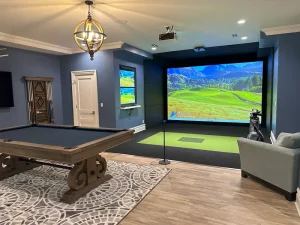
Before you spend $2,000–$20,000 on a golf simulator, you need to answer one question first: does your space actually work?
I’ve been playing indoor golf for years — including in my own 9-foot basement where I had to give up my driver and adjust my entire game — and I can tell you that getting the room size wrong is the most common and most expensive mistake new sim buyers make. This guide gives you the exact numbers so you can walk into any room in your house and know whether it’ll work.
Quick Answer: Golf Simulator Room Size at a Glance
| Dimension | Bare Minimum | Recommended | Ideal |
|---|---|---|---|
| Ceiling Height | 8.5 ft | 9 ft | 10 ft |
| Room Width | 10 ft | 12–14 ft | 15+ ft |
| Room Depth | 12 ft | 15–16 ft | 18–20 ft |
These are starting numbers — your actual needs depend on your height, your swing, and which launch monitor you choose. Keep reading and you’ll have a precise answer for your specific situation.
Why Room Size Is the First Decision You Should Make
Most guys get excited about launch monitors and software and spend days comparing TrackMan vs. Uneekor — then realize the setup they wanted doesn’t physically fit. Room size should drive your buying decisions, not the other way around.
Your space constrains everything else: which launch monitor is compatible, what screen size you can run, whether you need a short-throw projector, and ultimately how realistic your experience will feel. A great simulator in the wrong room is a frustrating simulator.
The good news: golf simulators can work in smaller spaces than most people think. You just need to know the trade-offs going in.

The Three Dimensions That Matter
Ceiling Height
This is the one that kills deals most often. You need enough vertical clearance to complete your full backswing with a driver without catching the ceiling.
At address, a typical golfer’s club extends about 3 feet above their head at the top of the backswing. Add your height, and that’s roughly the ceiling clearance you need.
General rules by ceiling height:
- Under 8.5 ft: A simulator is technically possible, but you’ll be limited to chipping and putting. Don’t do it for a full-swing setup.
- 8.5–9 ft: Workable, but you’ll likely need to shorten your swing with longer clubs. I swing a 5-iron maximum in my 9-foot basement — the driver stays in the bag.
- 9–10 ft: The sweet spot for most golfers under 6’2″. You’ll be able to swing normally through your mid-irons and, depending on your swing plane, your driver.
- 10 ft+: Full swing with every club, no modifications. This is what most manufacturers target as their “minimum recommended” height.
Pro tip: Before you measure the ceiling, check for obstructions: HVAC ducts, joists, light fixtures, garage door openers. The lowest point of any obstruction is your real ceiling height.
Room Width
Width determines whether you can swing freely side-to-side and whether both right- and left-handed golfers can use the space.
- 10 ft minimum: Enough for a single-handed golfer with the tee offset to one side. You won’t feel cramped if you’re swinging toward the screen, but the mat placement will be toward one wall.
- 12–14 ft: The sweet spot for a single-handedness household. Gives you comfortable side clearance and flexibility in positioning.
- 14+ ft: Needed if you want to center the tee for both righties and lefties. Also required if you want a standard 16:9 aspect ratio screen.
Width also affects your screen size options. A 12-foot wide room can support a 10-foot wide screen with room for the enclosure frame. A 14-foot room opens up a full 12-foot screen, which dramatically improves the visual experience.
Room Depth
Depth is the most misunderstood dimension. It’s not just “how far from the screen you stand” — it’s a chain of measurements that all have to add up.
Here’s how a 16-foot deep room breaks down:
- 2 ft behind the screen (wall protection, net or screen bowing on impact)
- 10–12 ft from screen to the center of the hitting mat (your standing position)
- 5–6 ft behind the hitting position for backswing clearance
This is why 16 feet is the commonly cited minimum — it’s barely enough to fit all three zones. At 18–20 feet, you have breathing room, better projector placement options, and space to add seating behind the golfer.
Why depth also affects your launch monitor choice: Radar-based launch monitors like the Flightscope Mevo+ and TrackMan require the ball to travel 6–8 feet before they have enough data. Camera-based systems like SkyTrak and GC3 need just 2–3 feet. If you have a shallow room (under 14 feet), a camera-based system is essentially your only viable option.
Golf Simulator Space by Room Type
Basement
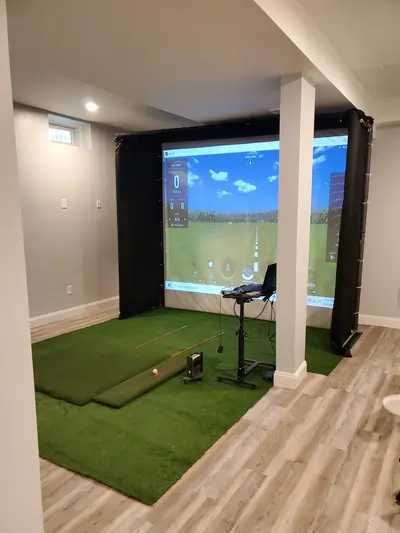
The basement is the most popular location for home golf simulators, and for good reason: it’s often the largest open space in the house, it’s climate-controlled, and neighbors below you won’t complain about impact sounds.
What to watch for in a basement:
- Ceiling height is the primary limiter. Most finished basements run 8–9 feet. Unfinished basements with exposed joists may give you more working height.
- Drop ceilings (suspended tile grids) can often be removed to gain 6–12 inches. If your drop ceiling is hiding 9.5 feet of actual clearance, you may be in better shape than you think.
- Support columns and beams. Measure the full usable open rectangle, not just the room perimeter.
- HVAC placement. Soffits housing ductwork can dramatically reduce usable ceiling height in one corner of the room.
Realistic baseline for most finished basements: 9 ft ceiling, 12–14 ft wide, 15–20 ft deep. This is workable for a great setup with the right launch monitor.
Garage
The garage is the second most common location and often the roomiest option, particularly for standard two-car garages.
A standard two-car garage is 20 ft deep x 20 ft wide with 8–9 ft ceilings at the walls, often rising to 10+ ft in the center peak. This is often the best canvas in the house, especially if you’re willing to insulate and heat it.
What to watch for in a garage:
- Garage door hardware hangs down from the ceiling 12–16 inches and can limit ceiling height at the front of the bay. Your sim will likely go at the back of the garage, away from the door.
- Insulation is essential if you’re in a climate with hot summers or cold winters. A golf simulator is miserable to use in a 40°F garage.
- Single-car garages (typically 10–12 ft wide) are tight but workable for a single-handed golfer.
A standard 2-car garage is one of the best possible golf sim rooms — you often get 10 ft ceilings, 20 ft depth, and 18+ ft of width. The main cost is climate control and finishing the space.
Spare Bedroom or Bonus Room
This is the third common option and typically the most constrained in terms of depth. Most spare bedrooms are 10–12 ft wide and 12–14 ft deep — which is workable but tight.
What to watch for:
- 12 ft of depth is the functional minimum. At this depth, you need a camera-based launch monitor, your tee will be close to the screen, and there’s zero room for seating behind you.
- 14 ft deep gives you a more comfortable setup. Combined with a 12-ft width, this is a solid spare-room configuration.
- Standard 8-ft ceilings in finished rooms above grade are limiting. You may be able to swing a 7-iron cleanly at 8.5 ft, but drivers are out.
How Your Height Changes the Equation
Your height and swing arc are the real variables behind every dimension recommendation. The numbers below are real-world guidelines based on driver swing height requirements.
| Golfer Height | Minimum Ceiling | Recommended Ceiling |
|---|---|---|
| Under 5’8″ | 8.5 ft | 9 ft |
| 5’8″–6’0″ | 9 ft | 9.5–10 ft |
| 6’0″–6’3″ | 9.5 ft | 10 ft |
| 6’3″+ | 10 ft | 10.5+ ft |
Note: These assume a relatively upright swing. Golfers with a more “over the top” or steep swing plane may need more clearance. The best test is to take your longest club into the room, take a practice swing in slow motion, and note the highest point of the grip — then add 6 inches of margin.
Space Requirements by Launch Monitor Type
This is the single most important table for anyone in the planning stage. Different launch monitor technologies have fundamentally different space requirements, and choosing the wrong one for your room is a $1,500–$5,000 mistake.
| Launch Monitor | Type | Min Depth | Notes |
|---|---|---|---|
| SkyTrak / SkyTrak+ | Camera | 12 ft | Best for tight spaces |
| Foresight GC3 | Camera | 12 ft | Side-mounted |
| Foresight GCQuad | Camera | 12 ft | Side-mounted |
| Uneekor QED | Camera | 12 ft | Overhead camera |
| Uneekor EYE XO2 | Overhead | 12 ft | Ceiling mount required |
| Flightscope Mevo+ | Radar | 15 ft | Needs ball flight |
| Garmin R10 | Radar | 15 ft | Budget-friendly |
| TrackMan iO | Overhead radar | 14 ft | Premium commercial |
Camera-Based Launch Monitors (SkyTrak, SkyTrak+, Foresight GC3, GCQuad, Uneekor QED/EYE XO)
These systems use high-speed cameras positioned beside or in front of the ball to capture data at impact. They need very little ball flight distance — typically 2–4 feet — to generate accurate data.
- Minimum room depth with camera systems: 12–14 ft
- Best choice for: Basements, spare bedrooms, tight spaces, or any room under 15 ft deep
- Tradeoff: Typically positioned to the side or in front of the ball, which can occasionally interfere with the swing path
Radar-Based Launch Monitors (Flightscope Mevo+, Flightscope Xi Tour, Garmin R10)
Radar systems track the ball in flight using Doppler radar and typically need 6–8 feet of ball flight to accurately compute all data points. In very short rooms, they may not capture spin or launch angle data reliably.
- Minimum room depth with radar systems: 15–16 ft (16+ strongly preferred)
- Best choice for: Garages, dedicated rooms, or any space with more depth
- Tradeoff: Radar monitors are often more portable and versatile for both indoor and outdoor use
Overhead / Ceiling-Mounted Systems (Uneekor EYE XO2, Uneekor EYE MINI, Protee VX, TrackMan iO)
Ceiling-mounted systems capture data from above the ball and offer the most natural, unobtrusive setup experience since there’s no device sitting beside or behind the mat.
- Minimum ceiling height: 9 ft (10 ft preferred for proper angle and accuracy)
- Mounting considerations: Most require a ceiling mount at a specific distance from the hitting area — check each manufacturer’s spec sheet
- Minimum room depth: Similar to camera-based systems, typically 12–15 ft depending on model
How Screen Size and Projector Affect Your Room Layout
Your screen size is limited by your room width, and your projector placement is limited by your room depth. These two facts interact in ways that can complicate your setup if you don’t plan for them.
Screen sizing basics:
- Most home setups use screens in the 10–12 ft wide range
- Screen height is typically 7–9 ft for a good aspect ratio
- Screens come in 16:9, 16:10, and 4:3 aspect ratios — the right choice depends on your room width and projector
Projector placement:
- Standard throw projectors need 10–14 ft between the lens and the screen
- Short-throw projectors (throw ratio 0.5–0.8) can work in 5–8 ft from the screen
- Ultra-short-throw projectors (under 0.5 ratio) mount within 2–4 ft of the screen
In a room that’s 14 ft deep, you cannot use a standard-throw projector mounted at the back of the room without it being in the middle of your swing zone. Either mount it ceiling-forward (above and in front of the golfer, pointed back toward the screen) or use a short-throw projector positioned lower and out of the swing path.
A good rule of thumb: if your room is under 16 ft deep, budget for a short-throw projector — it removes a major headache in placement.
When Your Space Is Too Small: Workarounds That Actually Work
Don’t have 10-foot ceilings or 16 feet of depth? You’re not alone. Here are adjustments that actually help — ranked from most to least impactful.
1. Choose a camera-based launch monitor Switching from radar to camera-based can reduce your minimum room depth requirement by 3–5 feet. This is the single highest-leverage decision for space-constrained setups.
2. Remove the drop ceiling If you have a suspended tile ceiling in your basement, removing it often reveals 6–18 inches of hidden headroom. In a 9-foot finished basement, you might find 9’8″ of actual clearance behind those tiles.
3. Offset the tee position Instead of centering your hitting mat in the room, offset it to the side. This lets you swing toward the screen at an angle, maximizing the diagonal swing space. Some launch monitors handle this better than others — camera-based systems generally handle offset positions well.
4. Use a short-throw or ultra-short-throw projector This reduces depth requirements for the projector setup and can let you shift your hitting position back a foot or two.
5. Switch to an outdoor swing training mode Some golfers with truly constrained ceilings (8.5 ft or under) use the simulator only for chip, pitch, and putting practice. While not ideal, a short-game focused setup is far better than nothing.
6. Lower the floor (for serious builders) In a basement, excavating 6–12 inches under the hitting mat creates effective headroom without touching the ceiling. This is a real renovation project, not a weekend hack — but for the committed home builder, it works.
Room Setup Considerations Beyond Dimensions
Once you’ve confirmed the space works dimensionally, here’s what else to plan for:
Flooring: The hitting area needs a hitting mat (typically 4×5 ft to 5×5 ft). Many builders run artificial turf or rubber flooring throughout the room for a consistent look and sound dampening.
Lighting: Overhead fluorescent lights can create glare on the screen and wash out your projected image. LED strip lighting positioned around the perimeter (not directly overhead) works well. Avoid pointing light sources toward the screen.
Sound: The impact of a golf ball hitting a screen is louder than you’d expect — roughly like a loud handclap. If your sim room shares a wall with a bedroom, consider acoustic foam panels on the side walls and mass-loaded vinyl behind the screen.
Climate control: Golf is a physically active pursuit and sim rooms generate heat. Make sure the space has adequate HVAC, and for garages, consider a mini-split system (separate heating and cooling from the rest of the house). Target 65–72°F for comfortable play.
Electrical: Plan for at least two dedicated 15-amp circuits — one for the projector and PC, one for other accessories. If you want a mini-fridge, lighting on a dimmer, and a TV for scores, run a third circuit. Do this before you finish the walls.
Netting: Even with an impact screen, balls can deflect sideways. Side netting on the walls adjacent to the hitting area protects your space and the people in it. This is especially important in wider rooms where you might have seating to the side of the hitting zone.
Frequently Asked Questions
What is the minimum ceiling height for a golf simulator? The functional minimum is 8.5 feet for shorter golfers with a flatter swing plane. Most people need at least 9 feet to swing comfortably through their mid-irons. For a driver, plan on 9.5–10 feet.
Can I put a golf simulator in my garage? Yes — a standard two-car garage is actually one of the best possible spaces for a home golf simulator. You typically get 18–20 ft of width, 20 ft of depth, and 9–10+ ft of ceiling height. The main work is climate control and finishing the space.
Can I put a golf simulator in my basement? Yes, with caveats. The limiting factor is almost always ceiling height. Most finished basements run 8–9 feet — workable with the right launch monitor and swing adjustments, but not ideal. Removing a drop ceiling often reveals more headroom than expected.
How much room do I need behind me in a golf simulator? Plan for at least 5 feet of clear space behind the hitting mat for a full backswing. Taller golfers with longer clubs need 6–7 feet. This is part of why 15–16 ft of total room depth is the recommended minimum.
What size room fits a golf simulator with enough room to swing a driver? For a driver swing, target at least 10 ft of ceiling height, 12 ft of width, and 16 ft of depth. Many people get away with less — but that combination is where you stop compromising.
Does the launch monitor affect how much space I need? Significantly. Radar-based launch monitors require 15+ feet of depth for accurate readings. Camera-based systems work in 12 feet or less. This is one of the most important variables to consider when planning your space.
Can I build a golf simulator in a 10×10 room? Technically possible for chipping and short game practice. For full swings, a 10-ft wide room is the absolute minimum, and 10 ft of depth is far too shallow for any full-swing setup. You’d be standing 6–8 feet from the screen, which is both uncomfortable and a ball-safety issue.
Final Word
The three numbers you need to confirm before you start planning are ceiling height, room width, and room depth. Everything else — launch monitor, screen, projector — flows from those.
If you’ve got 9+ ft ceilings, 12+ ft of width, and 15+ ft of depth, you can build an excellent home golf simulator that will genuinely change how much you practice. If you’re working with tighter dimensions, this guide has shown you the adjustments that make it work.
The biggest mistake is waiting until after you’ve bought the equipment to figure out the space. Measure first, buy second — and you’ll avoid the most common and most expensive pitfall in the whole process.

This website is a participant in the Amazon Services LLC Associates Program, an affiliate advertising program designed to provide a way for websites to earn advertising revenues by advertising and linking to Amazon.com. Some of the links on this page are affiliate links. This means that, at zero cost to you, I will earn an affiliate commission if you click through the link and finalize a purchase.