From frugal first setups to 4K simulator studios, these PCs and laptops are built to run modern golf sim software smoothly.
Most golfers obsess over launch monitors, projectors, and mats, then guess on the computer and hope it works. This guide flips that. In a few minutes, we’ll help you find the best golf simulator computer (PC or laptop) you need for smooth, realistic simulator play—whether you’re chasing 4K perfection, stretching a tight budget, or just trying not to buy the wrong thing twice.
Recommended Golf Simulator Computers
|
Computer |
Our Evaluation |
Key Facts |
Check Prices |
|---|---|---|---|
 |
Best High End Computer |
||
 |
Best “Smart Money” |
||
 |
Best Golf Sim Laptop |
||
 |
Best Budget Golf Sim PC |
High‑End Performance (4K & Serious Sim Play)
You’re building a simulator that feels closer to a tour‑level studio than a casual setup. Smooth 4K visuals, maxed‑out graphics, and rock‑solid performance matter more to you than shaving a few dollars off the budget. The computers in this group are built to handle demanding software, high frame rates, and heavy multitasking—so your sim looks incredible and never holds your game back.
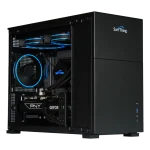
Best High End Performance Golf Simulator PC
Surf Thing SG3-5802
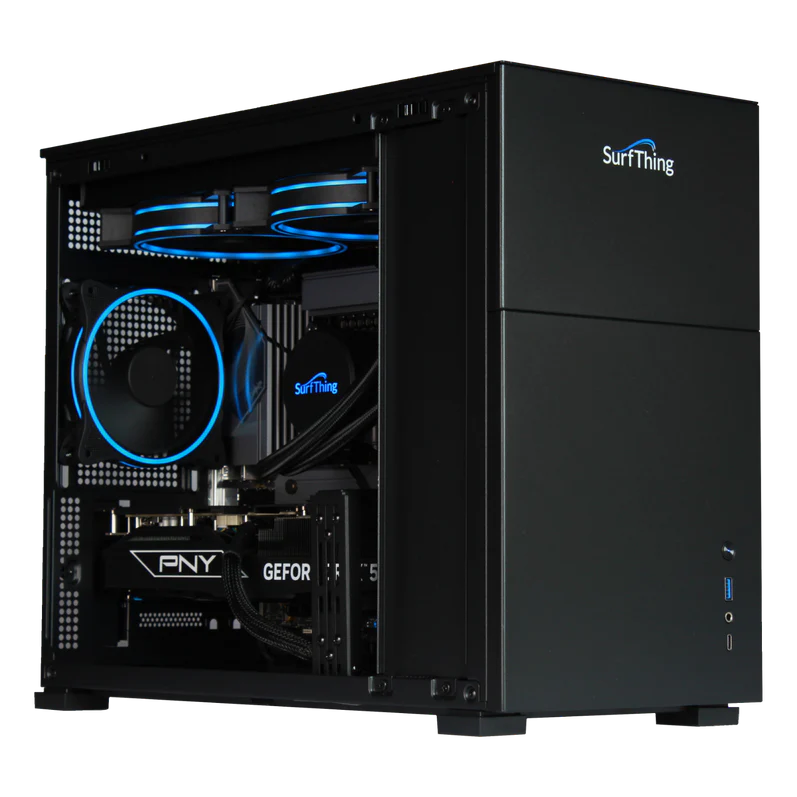
CPU: Intel Core Ultra 7 265F
Graphics Card: RTX 5080 16GB GDDR7
Memory: 32GB DDR5 6000MHz
Hard Drive: 2TB NVMe Gen4 SSD
Connectivity: Bluetooth 5.3, WiFi 6E
The Surf Thing SG3‑5802 is built for golfers who want their simulator to feel like a high‑end studio, not a laggy video game. Its Intel Core Ultra 7 processor and 32 GB of fast RAM give it more than enough headroom to handle demanding sim software, launch monitor data, and extras like swing‑capture or coaching tools all at once. That extra power keeps the time from impact to ball flight nearly instant, which is critical for staying in rhythm and actually trusting what you see on screen.
The SG3‑5802’s RTX‑class graphics card with 16 GB of VRAM is where it really separates itself for golf use. It can comfortably drive high‑resolution projectors and 4K displays with detailed course graphics and smooth ball flight, so you see realistic fairway textures, green contours, and ball spin instead of choppy animations. That makes reading shots, judging distance, and practicing short‑game nuance much more effective.
With a 2 TB NVMe SSD, the Surf Thing easily holds multiple sim platforms and large course libraries without forcing you to constantly uninstall things, and it loads rounds quickly so leagues and family sessions don’t stall at loading screens. Quiet liquid cooling and modern Wi‑Fi/Bluetooth support round it out, making it easy to tuck into a sim room and rely on day after day. In short, the SG3‑5802 is a “buy it once and forget about it” PC for serious home golf simulation.
|
Pros
|
Cons
|
|---|---|
Runner Up Options for High End Best Golf Simulator Computers
Here are three other top‑of‑the‑line options worth a serious look for high‑end golf simulation.
Smart Money (Best Performance for the Price)
You want your simulator to look great and run smoothly, but you also care about not lighting money on fire. The builds in this group focus on strong, reliable performance at 1080p or 1440p without paying a premium for power you’ll never use. If you like the idea of “buy once, buy smart,” these are the golf simulator computers that give you the most impact for every dollar.
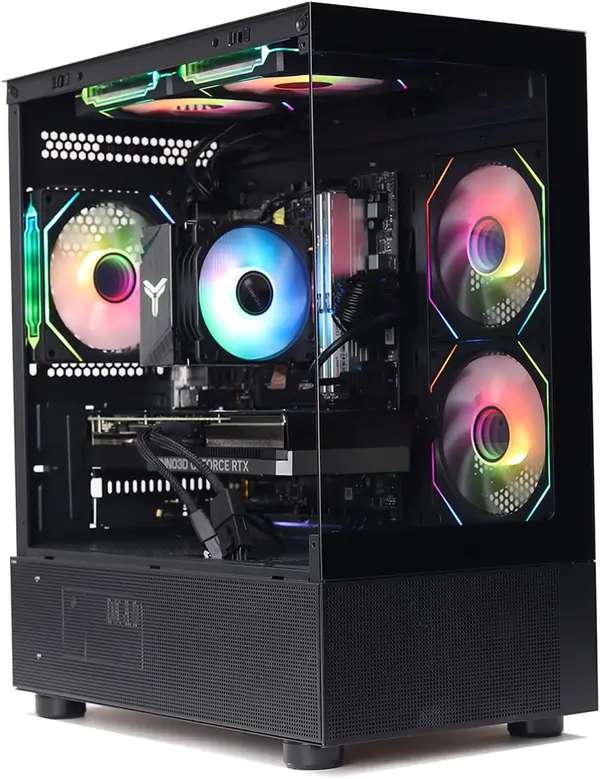
MXZ Gaming PC
CPU: Intel Core i7 13700F
Graphics Card: GeForce RTX 4070
Memory: 16GB DDR5 6000MHz
Hard Drive: 1TB SSD
Connectivity: Bluetooth 5.3, WiFi 6E
The MXZ gaming PC is a classic “smart money” tower for golf simulators: powerful enough to feel premium, without creeping into overkill territory. It’s built to handle modern sim software confidently, so you’re buying something that feels fast now and still has legs a few years down the road.
The Intel Core Ultra 7 paired with 32 GB of fast DDR5 memory keeps everything snappy even when you’re running a launch monitor app, sim software, and background tools at the same time. That matters because any delay between contact and on‑screen ball flight kills the realism and slows down practice or league play.
Its RTX 5080 with 16 GB of VRAM has more than enough muscle for very smooth 1080p and 1440p play and can comfortably stretch into 4K for many setups. That gives you crisp course detail, clean ball tracing, and fewer dropped frames when you pan around or watch replays, which makes it easier to judge distance, rollout, and spin.
The 2 TB Gen4 NVMe SSD means quick boot and load times plus plenty of room for multiple sim platforms, large course libraries, and recorded rounds. Combined with Bluetooth 5.3 and WiFi 6E, it’s easy to integrate into a sim room without a tangle of extra cables, while still keeping connections stable for updates and online play.
|
Pros
|
Cons
|
|---|---|
Smart Money Runner Up Options
A few more golf simulator PC’s we think are worth considering
Frugal First Simulator (Minimum Specs That Work)
You’re ready to get into the simulator world, but you need to keep costs under control. Your priority is a setup that runs the software reliably at reasonable settings so you can practice and play without constant technical issues. The options in this group meet (or slightly beat) the minimum recommended specs, giving you a working sim today—and a clear path to upgrade pieces later when the budget allows.
STGAubron Gaming PC Desktop Computer
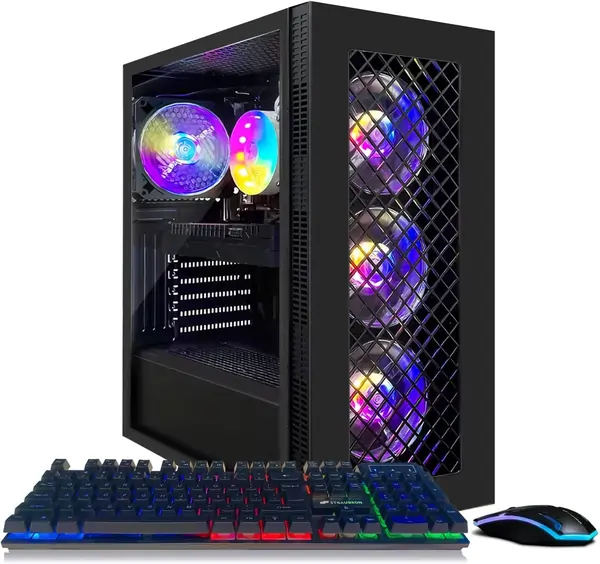
CPU: AMD Ryzen 7 5700X
Graphics Card: GeForce RTX 3060 12G
Memory: 16GB DDR4 RAM
Hard Drive: 1TB SSD
Connectivity: Bluetooth 5.2, WiFi 6E
The STGAubron Gaming PC is a smart budget pick for someone who wants a dedicated GSPro machine without overspending. Its Core i7‑class processor and 16 GB of RAM give you enough headroom to run your launch monitor software, GSPro, and basic background apps without the system feeling sluggish between shots. That keeps the gap from impact to on‑screen ball flight short, which is what really matters when you’re trying to stay in a good rhythm.
The dedicated mid‑range NVIDIA or Radeon graphics card (configurations often ship with RTX 2060/3060 or RX 580/590‑class GPUs) is the key piece for simulator use. These cards are well‑suited for 1080p play, so you can expect smooth frame rates with GSPro on a single projector or TV as long as you keep graphics settings sensible. For most home setups, that means crisp enough visuals to read fairways and greens clearly without paying for 4K‑only hardware.
A 512 GB–1 TB SSD gives you fast boot and load times, so courses and practice sessions spin up quickly instead of leaving you staring at loading screens. You’ll have room for GSPro plus a few other sim tools or games, and you can always add a second drive later if your course library grows. For league nights or family sessions, that responsiveness helps keep people playing instead of waiting around.
Finally, built‑in Wi‑Fi and Bluetooth plus a preinstalled copy of Windows 11 make it easy to drop this tower into a sim bay and get going with minimal setup. The flashy RGB case is mostly cosmetic, but it does make it easy to see status at a glance and adds some “sim bay” flair. Overall, it’s a very approachable starter PC that hits GSPro’s 1080p needs without pushing your simulator budget over the top.
|
Pros
|
Cons
|
|---|---|
Other Great Budget Performance Computers
A bit more information from our survey and research.
Best Golf Simulator Laptop
Golf simulator laptops are a different animal from everyday notebooks. You’re asking one machine to run demanding 3D graphics, crunch launch‑monitor data in real time, and stay cool in a tight hitting bay—all while remaining portable enough to move between home, office, and coaching sessions. In this section, we’ll look at laptops that are genuinely up to that job, focusing less on flashy specs and more on how each model actually handles GSPro, TGC 2019, and other leading sim platforms at 1080p and beyond.
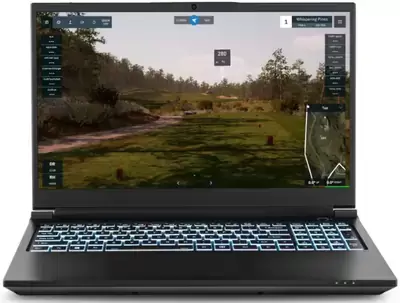
SurfThing M3H Golf Simulator Laptop
CPU: Intel Core Ultra 9 275HX
Graphics Card: NVIDIA GeForce RTX 5070
Memory: 32GB DDR5 RAM
Hard Drive: 2TB NVMe SSD
Connectivity: Bluetooth 5.x, WiFi 6E
The SurfThing M3H is built specifically for golf simulators, and you feel that as soon as you start hitting balls. The Intel Core Ultra 9 275HX and 32GB of DDR5 memory give you far more CPU headroom than a typical gaming laptop, which matters when you’re running launch monitor software, GSPro or TGC 2019, plus video capture or coaching tools at the same time. That extra horsepower keeps the delay between impact and on‑screen ball flight extremely short, so your sim feels natural and responsive rather than like a slow video game.
The RTX 5070 laptop GPU with 8GB of GDDR7 is the real engine behind smooth visuals. It’s powerful enough to drive high frame rates at 1080p and 1440p, and it can comfortably stretch to 4K in many setups when paired with a projector or large TV. For a golfer, that means crisp fairways and greens, clean ball tracing, and fewer stutters when you pan around or watch replays—details that make it easier to judge distance, rollout, and green contours accurately.
The 2TB NVMe SSD is also a big win for simulator use. Course libraries, multiple sim platforms (GSPro, E6, TGC 2019, etc.), and stored video can eat space quickly, and a smaller drive forces you to constantly uninstall and juggle content. With 2TB, you get fast load times and enough room to keep your main software, favorite courses, and recorded swings in one place, which is especially important if you travel with the laptop for lessons or on‑site installs.
Finally, Wi‑Fi 6E and Bluetooth make it easy to drop the M3H into almost any sim bay without running extra cabling. Fast, low‑latency Wi‑Fi helps with online rounds, updates, and cloud storage, while Bluetooth simplifies connecting speakers, remotes, or wireless input devices. Put together, the M3H gives you near‑desktop‑class simulator performance in a portable package that you can move between home, office, and teaching studio without sacrificing the feel of a high‑end sim.
|
Pros
|
Cons
|
|---|---|
Golf Simulator PC Requirements
This guide outlines the hardware requirements for the most prominent golf simulator software packages. To ensure “flawless” performance, the high-end builds utilize current-gen hardware (NVIDIA 50-series and Intel Core Ultra) to handle the significant graphical demands of 4K rendering and high-frame-rate physics.
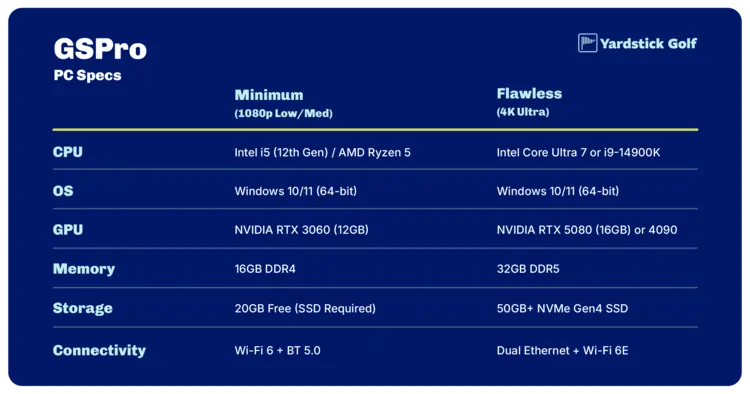
1. GSPro (Golf Simulator Software)
GSPro is the current industry leader for community-driven courses and open-platform support. It is highly optimized but requires a robust GPU for 4K “Ultra” settings. Laptop Users: Ensure laptops have adequate cooling, as running near minimum specs can cause overheating.
| Component | Minimum (1080p Low/Med) | Flawless (4K Ultra) |
| CPU | Intel i5 (12th Gen) / AMD Ryzen 5 | Intel Core Ultra 7 or i9-14900K |
| OS | Windows 10/11 (64-bit) | Windows 10/11 (64-bit) |
| GPU | NVIDIA RTX 3060 (12GB) | NVIDIA RTX 5080 (16GB) or 4090 |
| Memory | 16GB DDR4 | 32GB DDR5 |
| Storage | 20GB Free (SSD Required) | 50GB+ NVMe Gen4 SSD |
| Connectivity | Wi-Fi 6 + BT 5.0 | Dual Ethernet + Wi-Fi 6E |
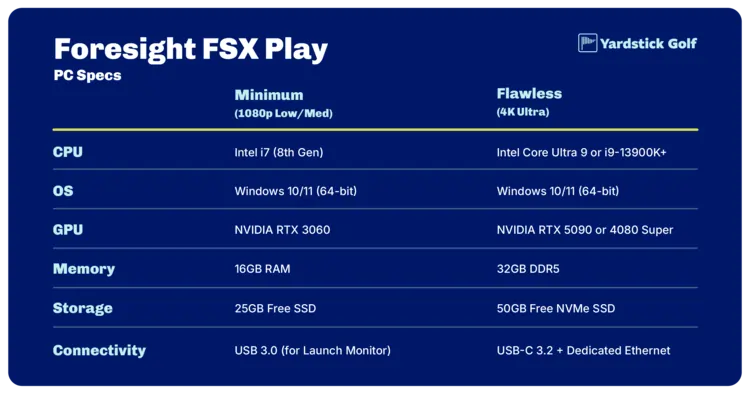
2. Foresight FSX Play
FSX Play is known for its hyper-realistic textures and heavy lighting effects. It is significantly more demanding in terms of PS specs than the older FSX 2020.
| Component | Minimum (1080p) | Flawless (4K Max) |
| CPU | Intel i7 (8th Gen) | Intel Core Ultra 9 or i9-13900K+ |
| OS | Windows 10/11 (64-bit) | Windows 10/11 (64-bit) |
| GPU | NVIDIA RTX 3060 | NVIDIA RTX 5090 or 4080 Super |
| Memory | 16GB RAM | 32GB DDR5 |
| Storage | 25GB Free SSD | 50GB Free NVMe SSD |
| Connectivity | USB 3.0 (for Launch Monitor) | USB-C 3.2 + Dedicated Ethernet |
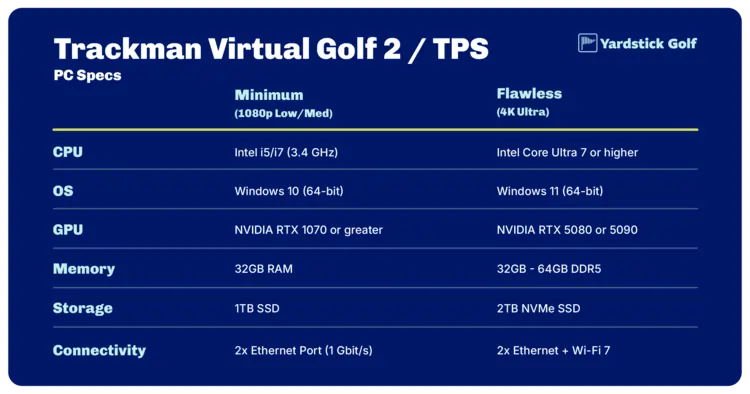
3. Trackman Virtual Golf 2 / TPS
Trackman software is notoriously resource-heavy because it processes high-speed radar data alongside high-fidelity graphics. Trackman officially mandates Intel CPUs for guaranteed stability. Also suggests no Intel Iris Xe GPU.
| Component | Minimum (HD Setup) | Flawless (4K Setup) |
| CPU | Intel i5/i7 (3.4 GHz) | Intel Core Ultra 7 or higher |
| GPU | NVIDIA RTX 1070 or greater | NVIDIA RTX 5080 or 5090 |
| Memory | 32GB RAM | 32GB – 64GB DDR5 |
| Storage | 1TB SSD | 2TB NVMe SSD |
| Connectivity | 2x Ethernet Port (1 Gbit/s) | 2x Ethernet + Wi-Fi 7 |
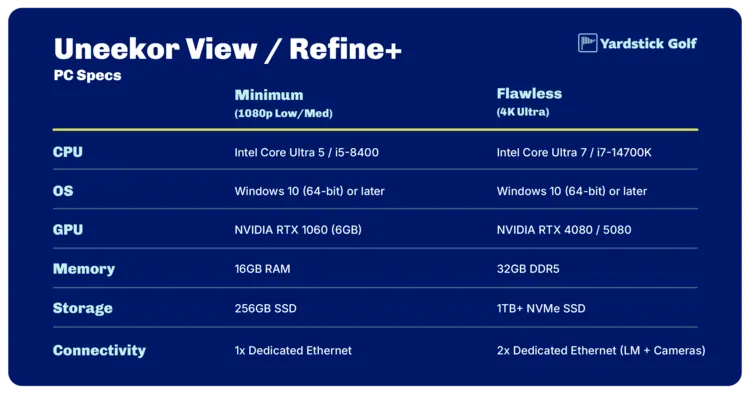
4. Uneekor View / Refine+
Uneekor software (View, Refine, and the Gameday add-on) requires high-speed data transfer to handle the “Swing Optix” high-speed camera streams.
| Component | Minimum (1080p) | Flawless (4K + Dual Cameras) |
| CPU | Intel Core Ultra 5 / i5-8400 | Intel Core Ultra 7 / i7-14700K |
| OS | Windows 10 (64-bit) or later | Windows 10 (64-bit) or later |
| GPU | NVIDIA RTX 1060 (6GB) | NVIDIA RTX 4080 / 5080 |
| Memory | 16GB RAM | 32GB DDR5 |
| Storage | 256GB SSD | 1TB+ NVMe SSD |
| Connectivity | 1x Dedicated Ethernet | 2x Dedicated Ethernet (LM + Cameras) |
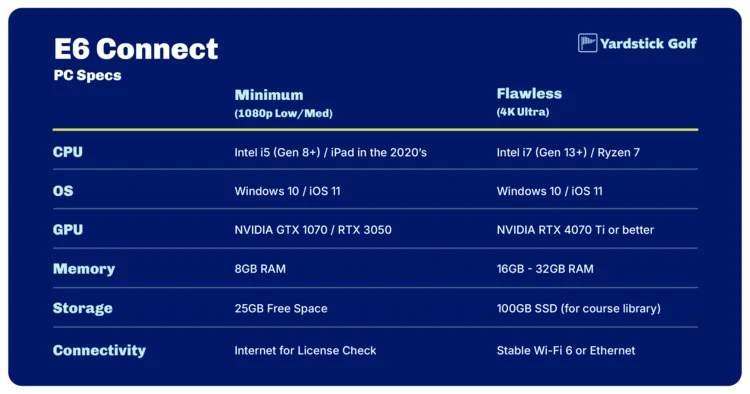
5. E6 Connect
E6 is one of the most widely used cross-platform packages. It is generally better optimized for mid-range PC hardware than FSX Play or Trackman.
| Component | Minimum (1080p) | Flawless (4K High) |
| CPU | Intel i5 (Gen 8+) / iPad in the 2020’s | Intel i7 (Gen 13+) / Ryzen 7 |
| OS | Windows 10 / iOS 11 | Windows 10 / iOS 11 |
| GPU | NVIDIA GTX 1070 / RTX 3050 | NVIDIA RTX 4070 Ti or better |
| Memory | 8GB RAM | 16GB – 32GB RAM |
| Storage | 25GB Free Space | 100GB SSD (for course library) |
| Connectivity | Internet for License Check | Stable Wi-Fi 6 or Ethernet |
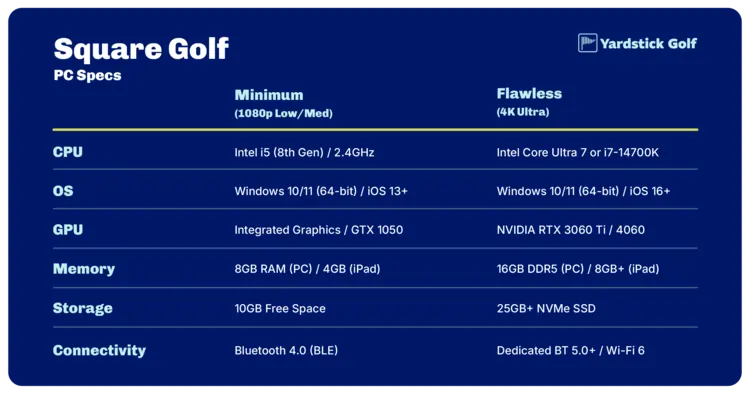
6. Square Golf Software
Square Golf is designed to be highly efficient, allowing it to run on a wide range of hardware from mobile devices to entry-level PCs. While it is lightweight, stable connectivity and modern operating systems are essential for the best experience.
| Component | Minimum (1080p Usable) | Flawless (High Frame Rate / 4K) |
| CPU | Intel i5 (8th Gen) / 2.4GHz | Intel Core Ultra 7 or i7-14700K |
| OS | Windows 10/11 (64-bit) / iOS 13+ | Windows 10/11 (64-bit) / iOS 16+ |
| GPU | Integrated Graphics / GTX 1050 | NVIDIA RTX 3060 Ti / 4060 |
| Memory | 8GB RAM (PC) / 4GB (iPad) | 16GB DDR5 (PC) / 8GB+ (iPad) |
| Storage | 10GB Free Space | 25GB+ NVMe SSD |
| Connectivity | Bluetooth 4.0 (BLE) | Dedicated BT 5.0+ / Wi-Fi 6 |
Critical Hardware Validations
- The “Flawless” Factor: For a simulator to run “flawlessly,” you must maintain a consistent 60 FPS at the native resolution of your projector. Dropping below 60 FPS causes “stutter” during the ball flight, which ruins the immersion.
- Ethernet vs. Wi-Fi: Most high-end launch monitors (Trackman, Uneekor EYE XO, Foresight Falcon) require a dedicated Ethernet port. If your PC only has one port, you will need a PCIe Ethernet card or a USB-to-Ethernet adapter to stay connected to the internet while the launch monitor is plugged in.
- GPU VRAM: For 4K simulation, 12GB of VRAM is the absolute minimum, but 16GB+ (found in RTX 4080/5080/5090) is required to prevent texture popping on high-resolution courses.