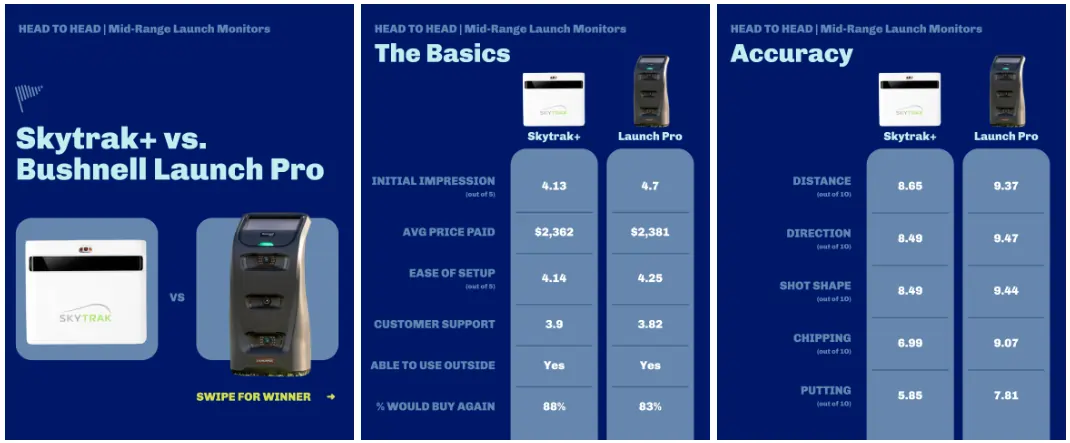
Researching a launch monitor still kind of sucks. The specs look amazing, the marketing is glowing, and then you get it home and realize no one mentioned your exact setup or use case. I wanted real‑world feedback from actual owners, not just brand decks and sponsored reviews, so I turned to the r/Golfsimulator community to crowdsource it.
In late 2025 I launched a short “Launch Monitor Buyer Satisfaction Survey” on Reddit and asked anyone with a golf simulator or launch monitor to share their experience. The goal was simple: collect enough honest responses that golfers could compare devices based on how they actually perform in garages, basements, and backyards—not just on paper.
How We Collected the Data
The survey was designed to be quick but detailed. Each respondent answered questions about:
- Which launch monitor they own and what they paid.
- Whether it requires a subscription and what tier they chose.
- Set‑up difficulty and first impressions.
- Accuracy scores for distance, direction, shot shape, short game, and putting on a 0–10 scale.
- Practical details like whether it works for right‑ and left‑handed players, indoor vs. outdoor use, and course satisfaction.
- We also gave them space for open ended feedback and boy did we get a lot of it.
I shared the survey on r/Golfsimulator several times while it was running, updating the community on progress and reminding people that the results would be public and free to use. That transparency helped drive participation from golfers who genuinely wanted better data for everyone.
How Many Golfers Responded and Launch Monitors Were Reviewed
By the time we closed the 2026 Launch Monitor Survey, we had over 650 responses, blowing past the original 500‑response goal. Those answers covered a broad range of devices, from budget radar units to premium camera‑based systems and commercial‑grade ceiling‑mounted models.
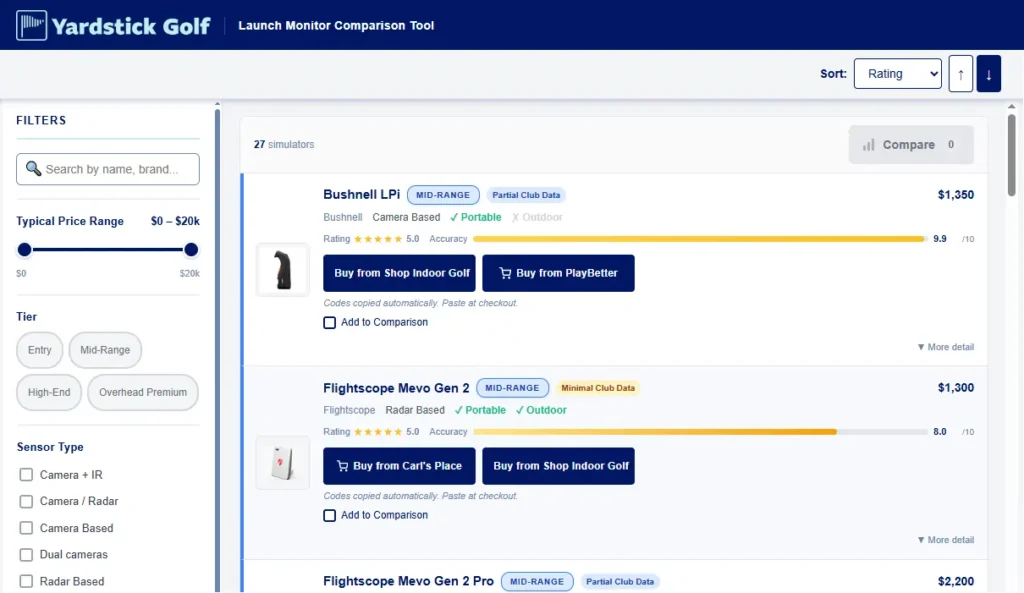
In total, the dataset includes feedback on 30 of distinct launch monitors—popular consumer options like Garmin, Rapsodo, Flightscope, SkyTrak, and Uneekor, plus higher‑end units from Bushnell, Foresight, and others. Because each response is tied to a specific model, you can filter by the exact device you’re considering and see how real owners scored it across the metrics that matter.


How We Grouped Launch Monitors for Easier Comparison
Raw survey rows are useful for analysts, but they aren’t friendly when you just want an answer to “Which launch monitor fits my budget and space?” So in the results sheet, we reorganized everything around how golfers actually shop:
- Budget / entry‑level units for players who want basic numbers without breaking the bank.
- Mid‑range devices that balance cost, accuracy, and features.
- Premium systems for golfers chasing tour‑level data or running a higher‑end sim room.
- Portable launch monitors that can move from home to the range.
- Fixed / ceiling‑mounted systems designed for dedicated golf simulator spaces.
Within each group, we built pivot tables that average the 0–10 scores for accuracy, realism on putting and short game, ease of setup, and support quality. That way, instead of scrolling through hundreds of individual responses, you can quickly see, for example, how budget radar units compare to portable camera systems on distance accuracy or how premium models differ on putting realism.
The Google Sheet: Your Free Launch Monitor Research Hub
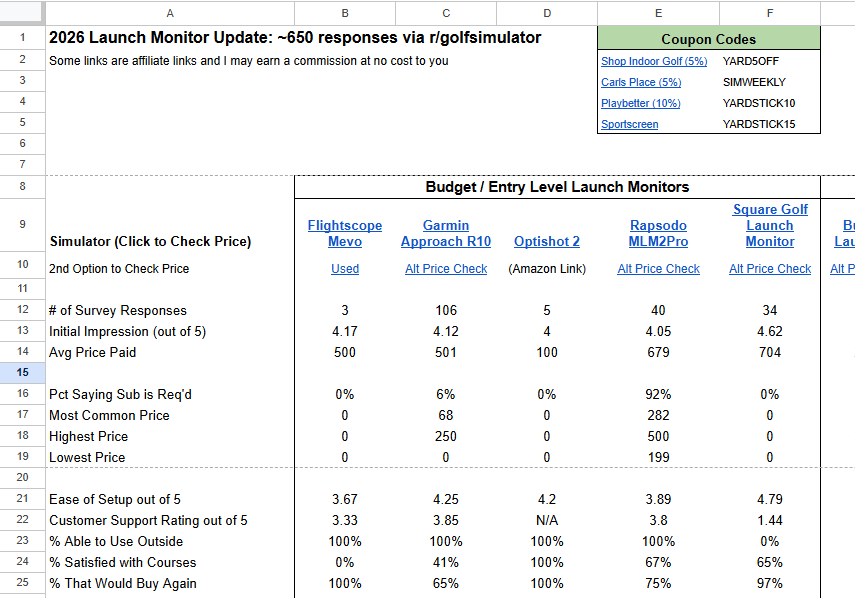
All of this work funnels into one place: a public Google Sheet that anyone can open, copy, and filter.
Inside the sheet you’ll find:
- A launch monitor tab with data summarized by launch monitor.
- Each launch monitor includes initial impression, accuracy, data captured, and average price paid.
- Launch monitors grouped views for budget, mid‑range, premium, portable, and fixed systems.
- Extra fields for things like space requirements and compatible software where respondents provided details.
If you’re:
- Trying to pick between a few specific launch monitors.
- Sanity‑checking whether a model’s putting or short‑game numbers are good enough.
- Curious how much people are really paying once subscriptions are included.
…you can answer those questions in a couple of minutes by slicing the sheet however you like.
How to Use the Sheet (And Why I Need Your Help)
The more golfers who use and share this sheet, the more useful it becomes:
- If you’re in research mode, start with the grouped tabs (budget, mid‑range, premium, portable, fixed) to narrow your options, then drill into the model‑level pivot tables for deeper comparison.
- If you’ve already bought a launch monitor and haven’t filled out the survey yet, consider adding your experience the next time we run it; that keeps the dataset fresh and helps other golfers avoid expensive mistakes.
I’ll link the Google Sheet directly in this article so you can open it in one click, bookmark it, and share it in threads where people are asking, “Which launch monitor should I buy?” The goal is for this to become a living, community‑driven resource that saves golfers hours of research and a lot of buyer’s remorse.