Most golf simulator accessory lists read like a store’s inventory page. This page works differently. My own gear comes first: the computer, control box, mats, and tees I use in my own build, with plain notes on how each has held up. Everything after that reports what named reviewers and owners found, and every one of those claims links to its source. Vendor claims are labeled as vendor claims. Buyer comments from retailer pages are labeled as buyer comments. Nothing is written as my experience unless I actually used the product.
The assumption throughout is that the big pieces are handled, so your launch monitor, screen, and projector are already running or on the way. If you are earlier in the process, start with our launch monitor guide, then browse all of our accessory guides before circling back here. This page is for the indoor golf accessories that make an existing setup easier to live with, shot after shot.
- 01How I Sourced This Page
- 02My Simulator PC: SurfThing SG3-5802
- 03Control Box: Roxor
- 04Golf Hitting Mats
- 05Plastic Tees: BirTees
- 06Floor and Wall Protection
- 07Swing Camera, Ball Tray, Storage Rack
- 08Projector, Lighting, Laptop Stand
- 09Putting Practice
- 10Bunker Mat, Impact Tape, Alignment Sticks
- 11Comfort and Atmosphere
- 12What You Don’t Need
- 13Golf Simulator Accessories FAQ
- 14Sources and Related Guides
How I Sourced This Page
Every “I” on this page is me, Lem, and it only refers to gear in my own simulator. Any other claim names the reviewer, forum poster, or store page it came from, with a link. Descriptions written by a maker or seller are labeled as vendor claims. Comments left on retailer product pages are labeled as buyer reviews. None of these products has enough Yardstick owner survey responses yet, so nothing here is scored, ranked, or given an award. Our how we rate page explains the bar an award has to clear.
My Golf Simulator PC: SurfThing SG3-5802
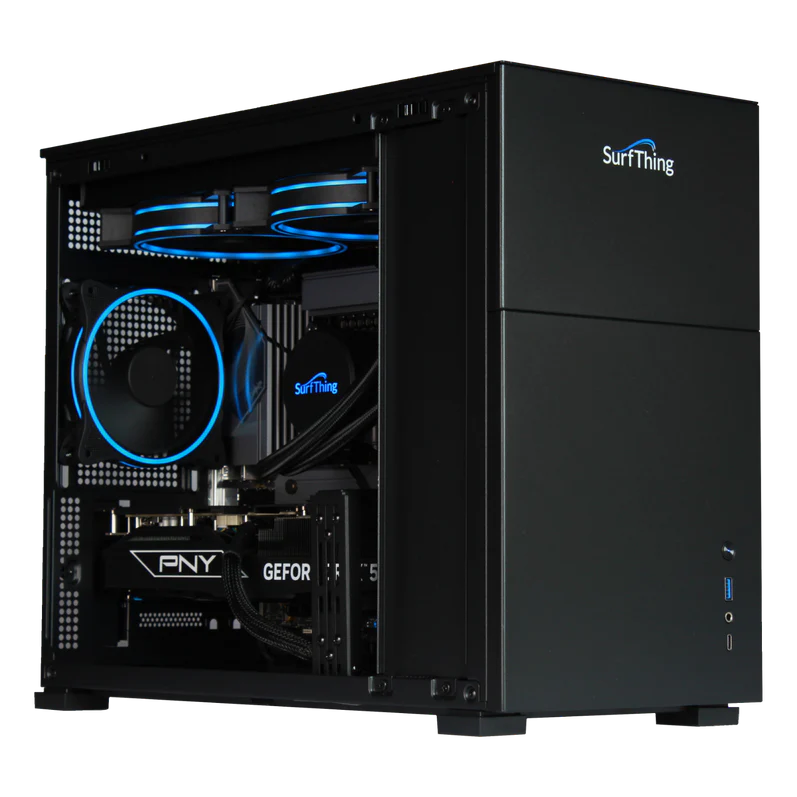
This is the high-end option in my build. The SurfThing SG3-5802 is screaming fast, it came with everything I needed to run the simulator, and it has been a low-maintenance workhorse. I start it fresh at the beginning of every session, so it does not sit powered on around the clock.
A sim room asks a lot from a computer. The graphics load runs the whole time, the launch monitor needs a steady connection, and a camera feed may be recording on top of both. Whatever you buy, the safe move is more graphics card than you think you need, since sim software and cameras both lean on it. SurfThing lists the SG3-5802 with an RTX 5080 (16GB), an Intel Core Ultra 7 265F processor, 32GB of DDR5 memory, a 2TB NVMe SSD, and a 280mm liquid cooler, running Windows 11 Home with WiFi 6E. The standard configuration was listed at $4,699 at time of writing, built to order in 3 to 5 days, with a wireless keyboard and mouse, a 2-year warranty, and optional preinstalled simulator software.
SurfThing’s own page lists step-down models in the same family: the SG3-5702Ti at $3,799, the SG3-5702 at $3,199, and the SG3-5602 at $2,249 with an RTX 5060, 16GB of RAM, and a 1TB drive. If any of those still stretch the budget, our golf simulator computer guide covers cheaper ways to get a sim-capable machine. Our golf simulator cost guide breaks down where the rest of a build’s money tends to go.
See the SurfThing SG3-5802Golf Simulator Control Box: Roxor

The Roxor control box is the accessory I did not expect to matter this much. Club changes and alignment adjustments happen at the mat instead of at the mouse. Mine has taken a lot of abuse and still works flawlessly.
The idea is simple: the box sits beside the mat, and you press its buttons with your club. The Shop Indoor Golf listing offers two versions, a wireless model for GSPro at $300 and a wired model for SkyTrak Course Play at $175, at time of writing. The versions are named for the software they target, so which one fits depends on your setup. Both exist for the same reason: the less you walk, the more shots you hit. The wireless version works up to 30 feet, is not Bluetooth, needs one open USB port for its dongle, and runs from a rechargeable battery pack. The listing shows a 6-month warranty.
Buyer reviews on that page run positive, with two snags worth knowing. Mark D. wrote in September 2024 that it beats walking back to the laptop for club selection and aiming changes. Mark F. called it a great add-on in December 2023, with the catch that setup gave him trouble and he only got moving after calling the number on Roxor’s website. Another buyer, oscar r., never received the wireless dongle with his order and planned to return the box and buy direct from Roxor instead. So the hardware gets praise, setup may take a phone call, and it pays to check the package when it arrives. If you are on the fence, think about your practice pattern. Range-style sessions with constant club changes benefit most, while a straight playing round touches the box less often.
See the Roxor Control BoxGolf Hitting Mats
I have used all three mats in this section: the Carl’s Place HotShot, the SIGPRO Softy, and the Fiberbuilt Flight Deck. All three perform well, and the HotShot is my favorite. Mats are also the most personal purchase on this page, since feel underfoot decides most of it. Here is what the reporting shows for each.

Carl’s Place HotShot
Carl’s Place builds the HotShot around a pre-cut, replaceable hitting insert, with three strip options: Standard, Foam Divot, and Gel. Per the Scheels and Home & Heat listings, sizes run 4×5, 5×7, and 4×9 feet, with an optional mat base in matching sizes. Carl’s Place describes the design as anti-fatigue and joint-friendly, which is a vendor claim, and notes the strips stand about 1.75 inches tall so they can be cut into other mats or flooring. Wisco Golf Addict reviewed the HotShot in December 2025 and found the insert system practical: a normal tee wedged between the mat and the insert held up for driver shots, and the Standard mat has three holes for tees. The 4×9 model is heavy, which the reviewer credited with keeping the mat planted, though moving it alone is a chore. Durability is the standout in that review. On size, the 4×9 gives the most room to stand and set balls down, with that weight caveat attached.
SIGPRO Softy
MyGolfSpy’s reviewer says softness is the whole point of the Softy, and calls it thicker than most mats, about 3/4 inch thicker than the Fairway Series mat in MyGolfSpy’s test shop. The same review describes it as light for its size, modular, and fairly stable. Thickness is the spec to watch with this one, since it drives both the feel and the footprint. Shop Indoor Golf lists the original Softy at 2-5/8 inches thick, and MyGolfSpy notes it is sold only through The Indoor Golf Shop, in 4×7 and 4×10 sizes.
Fiberbuilt Flight Deck
The Flight Deck sits at the premium end of the three, and it is the kind of mat used in many commercial bays. No independent review of this exact mat turned up during the research for this page, so this entry stays short on purpose. The link here goes to Shop Indoor Golf’s 4×7 single-sided studio version.
For thickness comparisons, DIY turf options, and more mats than any one room needs, see our golf hitting mats guide.
Plastic Golf Simulator Tees: BirTees
I use the white BirTees plastic tees, and the color is the whole point. Mine end up in the side netting or in the back of the enclosure area often enough that a bright tee saves a search every session. I also think white is less likely to mark a screen than a black tee, though I will call that an opinion rather than a tested claim.
When you compare plastic tees, here is the checklist:
- Wide base, so the tee does not tip when you set the ball or brush it
- Multiple heights in the pack, so driver and irons each get a workable tee
- Durable plastic that survives strikes instead of shattering into the turf
Any bright color solves the visibility problem, so pick what you can find cheapest. They are inexpensive, they migrate constantly, and a spare stack on the shelf is part of running a sim room. Buy more than you think you need.
Floor and Wall Protection
The area around the screen takes every miss, so it needs a plan. Two materials cover most rooms: carpet tiles for walls and ceilings, and horse stall mats for floors.
For padding, Ace Indoor Golf sells interlocking carpet tiles built for the job, 2×2 feet each and 5/8 inch thick, attached with adhesive on walls or ceilings. Ace’s own guide describes five rows of tiles covering a side wall or ceiling section. Whichever route you take, cover the zones your misses actually reach. The wall behind and beside the screen sees most balls, and low ceilings see the rest.
On the Golf Simulator Forum’s wall padding thread, one poster went a DIY route, mounting plywood from the screen back 8 feet on the walls and ceiling and stapling carpet tile to it. That poster reports missed shots bouncing off the carpet and back toward the screen instead of into the wall. Another poster in the same thread called gluing tiles straight to a ceiling a disaster, which is worth knowing before the adhesive comes out. Either way, test one tile before committing a wall.
Horse stall mats handle the floor, and they are dense rubber, not foam. Weight is the defining trait. A poster in the Golf Simulator Forum’s stall mat thread used 3/4 inch mats from Tractor Supply under a putting strip, found them heavy enough to stay put with no fastening, and cut them with a sharp utility knife while bending the mat. Another user, posting as intrinsic, dropped two golf balls onto one from over his head and says they bounced about half an inch. A third, GullLakeMi, calls horse mats very heavy and chose not to use them for exactly that reason.
For the frame, screen, and netting side of the room, our golf sim enclosure guide picks up where this leaves off.
Swing Camera, Ball Tray, and Storage Rack
Swing Camera
A swing camera is the fastest way to connect what you feel to what the launch monitor says. The Carl’s Place swing camera set is built for the job, with two cameras in the box. Per Carl’s Place’s listing, with the same specs appearing on retailer pages like Home & Heat, each camera is 2 megapixel with a 2.5mm wide-angle lens and a 10-foot USB cable, plus wall mount and tripod options. Frame rates are listed at up to 300 FPS at 360p, 120 FPS at 720p, and 60 FPS at 1080p, and the cameras work with any software that recognizes a camera connection. Those are vendor numbers, since no independent review of the set turned up for this page. Prices also differ between retailers, so compare before buying. If you record face-on and down-the-line, two cameras save the repositioning time between shots. For a cheaper starting point, this Amazon camera advertising 260 FPS is one option, and our golf swing cameras guide explains what matters beyond the frame rate figure.
Ball Tray
A tray of balls at hip height saves more bending than you would expect over a long session. GoSports lists its ball tray at a 70-ball capacity with a lip for scooping balls with your club, and says it works with any hitting mat. A buyer named Eric, in a review on the Golf Galaxy listing, said it looks sturdy and well made and fits his backyard hitting mat. Another buyer review, reposted on a desertcart page, said he bought a seven-pack for a home golf simulator and that they work perfectly. Dimensions vary from listing to listing, so measure your mat area before ordering.
Storage Rack
The least glamorous item on this page might be the one that keeps the room usable. Bags, shoes, and accessory boxes pile up fast around a sim, and the floor is a bad home for all of it. Whatever rack you choose, look for enough room for the golf bag itself, shelving for shoes and smaller accessories, and a stable base, since a leaning bag will test anything tippy. Measure the footprint before ordering, because racks sized for golf bags take more floor space than product photos suggest. If the rack shares the room with your swing, keep it out of the ball’s flight path. This GoSports golf bag organizer is one option in the category.
Projector, PC Add-Ons, Lighting, and Laptop Stand
Golf Simulator Projector
The BenQ TK710STi has the most public data behind it. The Smart Home Hookup measured the projector and found more than BenQ’s 3,200 lumen claim in Bright mode, though the reviewer did not find that mode very usable. Living Room mode measured 2,448 lumens with accurate colors. The review also reports good contrast, low input lag, and HDR support, and suggests keeping sim room lights a little dimmer than you might expect.
BenQ’s spec sheet, matched by PlayBetter’s listing, shows 4K resolution, 3,200 ANSI lumens, a laser light source rated 20,000 hours, a 0.69 to 0.83 throw ratio, an IP5X dustproof sealed engine, and about 30 degrees of keystone correction in each direction. Carl’s Place’s review says the short throw suits tighter spaces and cautions that 3,200 lumens can come up short in a room with a lot of ambient light.
The Optoma GT2000HDR is the 1080p alternative. Listings at Shop Indoor Golf and Carl’s Place put it at 3,500 lumens with a throw ratio around 0.5:1, a laser light source rated about 30,000 hours, HDMI 2.0 and VGA inputs, and about 30 degrees of keystone correction each way. No independent review of that model turned up for this page, and prices vary between stores. The BenQ TK710 is another 4K option in the same family. For throw math and screen pairing, our golf simulator projector guide covers the rest.
Lighting
Lighting gets left until last in most builds and missed immediately after. The goals are plain: light the room evenly, keep glare and direct spill off the screen, and give camera-based launch monitors the contrast they need to track the ball. Dimmable fixtures settle the tension between projector brightness and room brightness, so you can brighten for practice and dim for a round. Fixtures mounted along the side walls tend to keep light off the screen better than overhead cans aimed down the middle. Keep any fixture out of the camera’s view of the ball. Our golf sim lighting guide covers fixture types and placement.
Laptop or Computer Stand
A laptop that runs the sim deserves better than the floor. A stand keeps it out of the swing path, away from stray balls, and off carpet that chokes its cooling. Place it where cables reach both the launch monitor and the projector without crossing the hitting area, and check the lid angle if you use the laptop’s own screen as a second display. Running a tower instead? A small side table does the same job, with the same rules about the swing path.
Putting Practice
PuttOut Pro
The PuttOut Pro is the low-tech option, and it has the deepest paper trail on this page. Golf Monthly’s Joel Tadman tested the PuttOut Home Putting Studio, which includes the Pro mat, and says the mat does a good job of rewarding good putts and punishing bad ones, though it does not return the ball all the way. Lisa Skelton, a reader reviewer at Women & Golf, found the mat heavy and quick to roll out flat, with no curled edges. Golfers Authority tested the smaller Medium version, a 7.9 by 1.6 foot mat with a pile-cut nylon surface, and describes it as a tool for straight-line repetition and off-season practice rather than breaking putts or slopes. Will Shaw, a PGA pro writing at Golf Insider UK, notes PuttOut built the mat to run at about 10 on the stimpmeter, and that reviews are mixed on how true it rolls. None of these mats need power or software, which is half their appeal.
ExPutt EX500
ExPutt works differently: a camera watches the ball and the putter, and its own app renders virtual greens for real-time feedback. PlayBetter’s listing describes the kit as a camera, tripod, connecting rod, and putting mat. National Club Golfer’s reviewer tried the ExPutt RG and liked the easy setup, quality components, and engaging virtual greens, while concluding it may be overkill if all you want is a simple mat. One correction from earlier versions of this page: ExPutt is a standalone camera system with its own app, not a green-reading feed inside simulator software. If your off-season putting is the weak spot in your practice, this is the high-tech end of the options here.
PUTT RETURN
PUTT RETURN is a putting mat that returns the ball after each putt, which is the entire feature: putt, watch it come back, putt again. No independent review of this exact product turned up for this page.
Bunker Mat, Impact Tape, and Alignment Sticks
Bunker Mat
A bunker mat keeps sand feel in the rotation without a real trap. Look for a filled base that holds its material and a surface that lets the club enter and release the way sand does, then practice opening the face and swinging easier. Place it off to the side of your stance line, the way a greenside bunker sits relative to a green. The HamRoRung bunker mat is one example in this category, with no independent review of that specific product available for this page.
Impact Tape
Impact tape is the cheapest feedback on the page. Stick it on the clubface, hit a few balls, and the marks show heel and toe strikes that launch monitor numbers alone can hide. It is a session tool rather than a permanent install. It pairs well with a swing camera, since strike and path explain different halves of a poor shot.
Alignment Sticks
Alignment sticks carry over from the course unchanged. Lay one along your target line during practice rounds until your aim on screen matches your aim in your head, and use a second for ball position or path checks. They are cheap, flat, and store anywhere, and they work as well indoors as out.
Comfort and Atmosphere
Mini Fridge or Cooler
Sessions run long, and kitchen trips break the rhythm. A compact fridge handles it if the room allows. A soft cooler like the YETI Hopper Flip is the low-commitment version: fill it before a session and tuck it in a corner, away from the hitting area.
Large Display
A wall-mounted TV or large monitor changes how the room gets used. Stats, scoreboards, and replays stop stealing projector real estate, and anyone else in the room can follow the round without standing behind the ball. A screen you already own works, so this is often a zero-cost addition.
Sound System
Small speakers usually sound better than a projector’s built-in audio, and you can place them where the room sounds good instead of where the projector happens to hang. Bluetooth speakers work fine, which makes this another use-what-you-have item. Keep them out of the ball’s flight path.
Golf-Themed Décor
Flags, course prints, old scorecards, whatever fits the space. Décor changes nothing on the launch monitor, and it is still what guests mention first. Keep everything off the ball flight path and out of the netting, and make the room look like yours, since you are the one spending the evenings in it.
What You Don’t Need
A short skip list, written as guidance rather than test results.
- Duplicate training aids. The launch monitor already reports path, face, strike, and ball speed. Most training aids repeat one of those signals in a worse format. Keep the one or two you actually use and let the data carry the rest.
- “Simulator balls.” Balls marketed just for simulators rarely earn a spot in a screen setup. Hit what you play with, and save specialty balls for rooms that genuinely need them.
- Multiple cameras early. One camera answers most swing questions. Add a second only when your software and your practice plan demand the extra angle, since each camera adds cables and setup time.
Skipping these three keeps budget free for the items higher on this page that get used every session.
Golf Simulator Accessories FAQ
What is the most important golf simulator accessory?
For most people, the hitting mat. Every shot in the room goes through it, so a mat that is hard on your joints or wears out fast gets noticed before any other component does. Get that right first, then add conveniences like a control box or ball tray as budget allows.
Do I need a dedicated PC for my golf simulator?
Not always. A modern laptop can run a lot of sim software, and our golf simulator software guide lists what to check. A dedicated tower buys two things: the sim stops competing with the household computer, and the graphics card can be specced for your projector and cameras. Mine is a dedicated machine, and it has needed almost nothing from me.
Do I need a control box?
No, and plenty of golfers run fine from the mouse. A control box saves the walk around the desk every time you change clubs or adjust aim. The Roxor’s buttons are pressed with your club, and the wireless version reaches about 30 feet, per the vendor’s listing. For solo practice, it is the kind of convenience that is hard to give back.
What camera should I use for swing recording?
Start with our golf swing cameras guide for the full rundown. Carl’s Place’s two-camera set is purpose-built, with vendor-listed frame rates of up to 300 FPS at 360p and 120 FPS at 720p. Budget cameras on Amazon advertise 260 FPS, though neither listing had independent reviews available for this page.
Can I use regular golf balls in my simulator?
With a screen and enclosure, yes, and that is how most rooms run. Using the balls you actually play with keeps the numbers on screen meaningful. Specialty and foam balls mostly make sense for tight spaces or unusual surfaces, not standard builds.
How do I keep the projector from getting hit?
Ceiling mount it behind and above the hitter, far enough back that a driver at full extension cannot reach it. Short-throw models help because they hang closer to the screen and farther from your backswing. If the geometry is tight, a shelf or cage over the unit is inexpensive insurance.
Is lighting important in a sim room?
Yes, more than most people expect. Uneven light washes out the screen, and camera-based launch monitors need consistent contrast to track the ball. Dimmable fixtures let you brighten for practice and darken for rounds. Our golf sim lighting guide covers fixtures and placement.
Sources and Related Guides
Sources
- SurfThing, SG3-5802 product page
- Shop Indoor Golf, Roxor control box listing and buyer reviews
- Scheels, Carl’s Place HotShot listing
- Home & Heat, Carl’s Place HotShot listing
- Wisco Golf Addict, HotShot review
- MyGolfSpy, SIGPRO Softy review
- Golf Simulator Forum, “Simulator Wall Padding” thread
- Golf Simulator Forum, “Horse stall mats for putting strip” thread
- Golf Simulator Forum, garage flooring thread
- Golf Simulator Forum, “Mat to stand on while swinging” thread
- Carl’s Place, swing camera set listing
- Home & Heat, Carl’s Place swing camera set listing
- The Smart Home Hookup, BenQ TK710STi review
- Carl’s Place, BenQ TK710STi review
- BenQ, TK710STi product page
- PlayBetter, TK710STi listing
- Shop Indoor Golf, Optoma GT2000HDR listing
- Carl’s Place, Optoma GT2000HDR listing
- Golf Monthly, PuttOut Home Putting Studio review
- Women & Golf, PuttOut Home Putting Studio review
- Golfers Authority, PuttOUT Medium mat review
- Golf Insider UK, PuttOut review
- National Club Golfer, ExPutt RG review
- PlayBetter, ExPutt RG listing
- Golf Galaxy, GoSports ball tray listing and buyer review
- desertcart, reposted ball tray buyer review
Related Guides
- All accessory guides
- Golf hitting mats guide
- Golf simulator computer guide
- Golf sim lighting guide
- Golf swing cameras guide
- Best golf simulator projectors
- Launch monitor guide
- Golf simulator software guide
- Golf sim enclosure guide
- Golf simulator cost guide
- How we rate