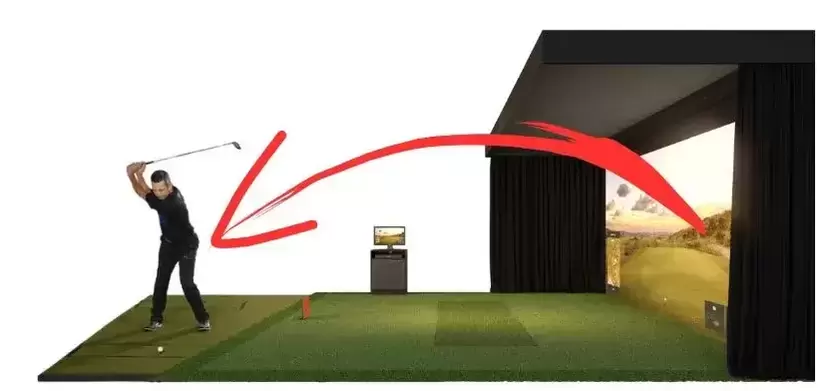
Golf impact screen bounce back can be a frustrating and potentially dangerous problem in a golf simulator. When the ball ricochets off the impact screen or enclosure frame and flies back toward the golfer, it can disrupt the swing and even cause injuries. However, with proper measures and adjustments, you can significantly reduce the bounce back and create a safer and more enjoyable golfing experience in your home simulator. In this comprehensive guide, we will explore various strategies and tips to minimize golf impact screen bounce back, make sure you have enough space behind the screen and enhance your practice sessions. Let’s dive in!
1. Buffer Space: Create a Safe Distance
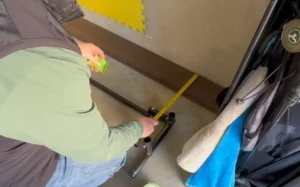
One of the key factors in reducing golf impact screen bounce back is ensuring that you have sufficient buffer space between the screen and any surrounding surfaces. This buffer space acts as a safety zone and prevents the ball from bouncing back towards you.
To achieve this, start by positioning the impact screen itself 12-16 inches in front of any solid surface, such as a wall. The is true for both fixed-position screens and golf impact screens that retract or roll-up. This gap allows for a cushioning effect and minimizes the chances of the ball rebounding forcefully. Additionally, make sure to stand at least 15 feet away from the screen when swinging to further decrease the risk of bounce back and potential injury.
Caution:Standing closer than 10-12 feet to the screen can increase the risk of bounce back and pose a safety hazard. Maintain a safe distance to protect yourself and others.
2. Proper Screen Installation: Tension and Adjustments
The installation of the impact screen plays a crucial role in minimizing bounce back. It’s essential to achieve the right level of tension and allow for some flexibility in the screen to avoid excessive rigidity.
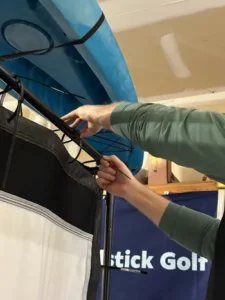
Ensure that the screen is installed flat, with proper tension. If you experience issues with bounce back, consider removing a couple of bungees from each side to reduce the tension. This adjustment can help strike a balance between flatness and flexibility, reducing the likelihood of the ball bouncing back towards you.
If you have a DIY golf simulator enclosure or a pro golf enclosure kit, ensure that the frame dimensions match the size-specific diagram provided. A frame that is too tight can increase the chance of bounce back, while a loose fit may result in waves or ripples on the screen. Adjust the frame accordingly to achieve optimal tension and flatness.
Quick Calibration Tip: If you are testing your tension, start with the bungees loose and tighten them one by one until the “waves” in the fabric disappear. Stop there—any tighter and you’re entering the “trampoline zone.”
3. Choose the Right Screen Material: Impact-Resistant and Noise Reduction
Selecting the appropriate impact screen material is crucial in minimizing bounce back and enhancing safety in your golf simulator. Look for screens specifically designed to reduce bounce back and absorb the impact of golf balls.
Consider investing in on of the premium impact screens on our review page. These premium screens not only enhance safety but also provide a high-quality image for an immersive golfing experience.
4. DIY Golf Enclosure Add-ons: Foam Inserts for Extra Protection
If you want to add an extra layer of protection to prevent the ball from striking the frame, consider using foam inserts in your DIY golf enclosure. These inserts can be easily installed by slipping them behind the screen flaps and covering the pipes of the frame.
Foam inserts act as a cushioning barrier, blocking the ball from hitting the frame and reducing the chances of bounce back. They are not visible from the front of the enclosure, ensuring a seamless and professional appearance. If you don’t have access to specific foam inserts, you can explore alternative foam or padding options available at hardware or craft stores.

5. Pro Golf Enclosure Add-ons: Safety Cushions and Baffles
For those using a pro golf enclosure, additional safety measures are available to further minimize bounce back. Pro enclosure kits often come with foam safety cushions that surround the screen and act as a protective barrier against ball impacts.
In addition to safety cushions, you can consider installing safety baffles that hang down from the ceiling. These strips of vinyl, positioned at a suitable distance from the screen, help catch and knock down high-angle shots that might bounce off the screen. Safety baffles provide an added layer of protection and help prevent the ball from rebounding towards you or others in the simulator room.
6. Accessories: Mat Selection and Turf Options
Choosing the right mat or turf can also contribute to minimizing bounce back in your golf simulator. Opt for softer mats or turf materials that provide a more forgiving surface for the clubhead and golf ball.
Hard mats can sometimes cause the clubhead to bounce into the ball at an odd angle, resulting in errant shots and ricochets. Using a softer mat or turf reduces the impact energy transfer and the likelihood of the ball bouncing back towards you. Experiment with different mat options to find the one that best suits your swing and reduces bounce back effectively.
7. Embrace Minimal Bounce Back: Ball Return Benefits
While the primary goal is to minimize bounce back for safety reasons, a small amount of bounce back can actually be beneficial. Think of it as having your own golf simulator ball return system.
If you prefer using a single ball during your practice sessions and enjoy the convenience of having the ball gently bounce back towards the tee, a minimal amount of bounce back can work in your favor. Embrace this feature as long as it remains within a safe range and does not pose any risks or distractions.
In Conclusion: Enhancing Safety and Enjoyment
Reducing golf impact screen bounce back is crucial for both safety and optimal practice in your golf simulator. By following the tips and strategies outlined in this guide, you can create a safer environment and minimize the chances of injury or disruption during your swing.
Remember to maintain a suitable buffer space between the screen and surrounding surfaces, ensure proper screen installation with the right tension, and select impact screen materials designed to minimize bounce back. Consider utilizing DIY enclosure add-ons like foam inserts and explore pro enclosure options with safety cushions and baffles for added protection.
Additionally, choose softer mats or turf options to reduce the rejection force and embrace a minimal amount of bounce back for convenient ball return. With these measures in place, you can enjoy a safer and more immersive golfing experience in your simulator.
How much space do I really need behind my impact screen?
For most setups, 12 to 16 inches of clearance from the wall is the gold standard. If you use a high-quality, heavy-duty “spacer” mesh screen, you might get away with 10 inches, but anything less risks the ball hitting the drywall and rebounding with dangerous velocity.
Should my screen be “drum-tight” for the best image?
Actually, no. While a tight screen looks better for movies, it creates a “trampoline effect” for golf balls. You want the screen to be flat but not under high tension. A good rule of thumb: you should be able to easily push the center of the screen back 3–4 inches with your hand.
What is the most dangerous part of a simulator enclosure?
The bottom frame rail is the primary culprit for “pop-up” rebounds that can hit a golfer in the face. If your enclosure uses a metal pipe at the base, it must be covered with high-density foam or a triangular foam “stop” to deflect low-strikes downward or deaden them completely.
Can I use moving blankets to reduce bounce-back?
Yes, moving blankets are a highly effective “poor man’s” solution. Hanging one or two blankets loosely behind the main impact screen (not touching the screen itself) acts as a secondary curtain that absorbs residual kinetic energy and prevents the ball from reaching the wall.
Why is the ball bouncing back more than it used to?
Impact screens are consumables; over time, the fibers can stretch or lose their elasticity, particularly in the “center-mass” area where you hit most of your shots. If you notice increased bounce-back, check your bungee cords. They often lose their “snap” before the screen fails—replacing worn bungees with adjustable ones can help you fine-tune the tension again.
How do I stop the ball from “worm-burning” under the screen?
If there is a gap between the screen and the floor, balls will inevitably escape. The best fix is a weighted bottom sleeve or a heavy foam “wedge” tucked against the base. This not only stops the ball but also provides a soft surface that prevents the ball from hitting the floor and bouncing back up.