Every golf simulator space needs the same handful of signs posted: house rules, assumption of risk, alcohol policy, emergency info and occupancy limits. The Sign Niche, from the team behind the CoverMyNiche golf simulator insurance program, packages all of them as print-ready downloads you can have on the wall today.
See the signs
Choose your bundle
Green & White
Signature fairway green. Clean and easy to read from across the bay.
- Instant PDF download
- 11×17 and 8.5×11 sizes
Black w/ Green
Bold black with a bright green accent. Built for darker, modern spaces.
- Instant PDF download
- 11×17 and 8.5×11 sizes
Black & White
Classic high contrast. Matches any brand and prints great anywhere.
- Instant PDF download
- 11×17 and 8.5×11 sizes
Signs are a risk management tool. They don’t replace insurance, a signed waiver or legal advice, and posting them doesn’t guarantee coverage or approval by any insurer.
What’s in the set
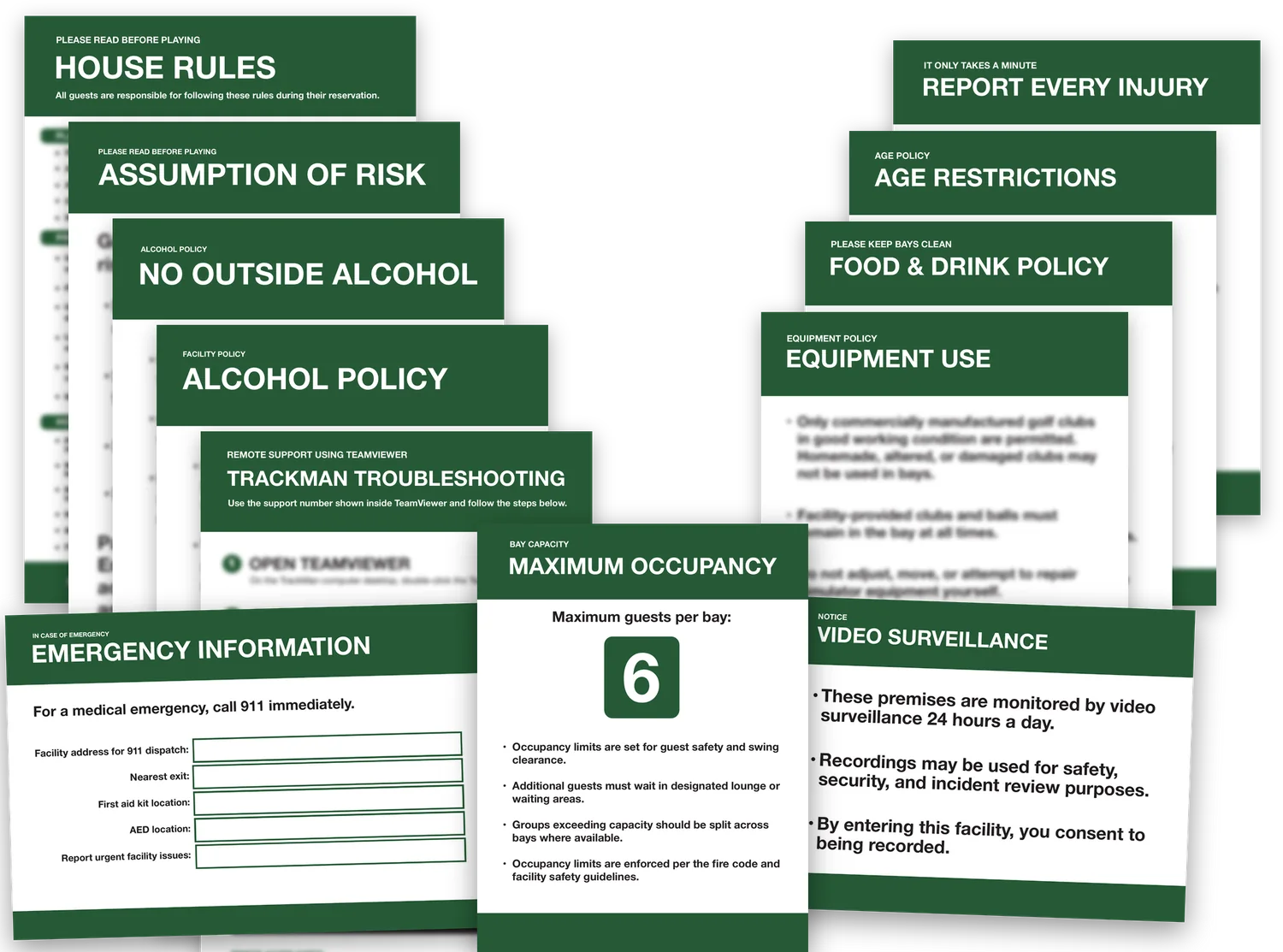
The bundle covers the rules, risk and safety notices a commercial simulator facility needs on its walls. Here’s what the main signs handle.
| Sign | What it covers |
|---|---|
| House Rules | The ground rules every guest agrees to follow during their reservation. |
| Assumption of Risk | Puts guests on notice that golf carries inherent risk, including swings, ricochets and equipment, before they step into a bay. |
| Maximum Occupancy | Guests allowed per bay, for swing clearance and safety. Comes in 4-guest, 6-guest and blank versions so you can write in your own limit. |
| Emergency Information | Fill-in fields for the facility address for 911 dispatch, nearest exit, first aid kit and AED locations, and who to call for urgent issues. |
| Alcohol Policy | Your rules for alcohol service and consumption on site. |
| No Outside Alcohol | Keeps guests from bringing their own drinks into a licensed space. |
| Food & Drink Policy | What can come into the bays and how guests should leave them. |
| Equipment Use | Commercially made clubs only, facility clubs and balls stay in the bay, and guests don’t adjust or repair simulator gear. |
| Age Restrictions | Your policy on minors and supervision. |
| Video Surveillance | Notice that the premises are recorded and that entering means consent to being recorded. |
| Report Every Injury | Tells guests to report any injury to staff, no matter how minor. |
| TrackMan Troubleshooting | Step-by-step instructions for getting remote support through TeamViewer, so guests can fix common issues without pulling staff. |
Where to post them
A sign only works if guests see it at the moment it applies. Group them by where in the visit each rule matters.
Entrance and check-in
Post House Rules, Assumption of Risk, Age Restrictions and Video Surveillance where guests check in or wait for their bay. These are the signs you want every guest to have passed before they pick up a club, and surveillance notices belong at the point of entry.
Inside each bay
Maximum Occupancy, Equipment Use and Report Every Injury go in every bay, on a side wall outside the hitting area where groups will see them while they’re waiting to swing. Put TrackMan Troubleshooting next to the simulator PC or kiosk, since that’s where guests will be standing when something goes wrong.
Bar, lounge and food areas
Alcohol Policy, No Outside Alcohol and Food & Drink Policy belong where drinks are served and where guests come in carrying them. If guests can carry drinks into the bays, a second copy of the Food & Drink Policy in each bay saves a lot of cleanup conversations.
Near first aid and exits
Fill in Emergency Information and post it beside the first aid kit and AED, plus one in each bay or hallway. In an emergency, nobody should have to hunt for the address to give a 911 dispatcher.
Alcohol signage, occupancy limits and recording notices can be set by your state, city, fire marshal or liquor license. Confirm any posting requirements that apply to your facility.
Printing and mounting tips
The signs come in two sizes: nine at 11×17 and eight at 8.5×11. Print with “Fit to page” turned on. A local print shop or office store can run the whole set in one order, which is the easiest route for a multi-bay facility since you’ll want copies of the in-bay signs for every bay.
- Use matte, not gloss. Simulator bays are dark with bright projector light, and glossy lamination throws glare that makes signs hard to read.
- Mount on something rigid. Foam board is cheap and fine for low-traffic walls. PVC board holds up better in bays and bar areas where signs get bumped and wiped down.
- Frame the high-traffic signs. Snap frames or acrylic sign holders let you swap a sign without taking anything off the wall, which helps when you update a policy or change occupancy limits.
- Keep signs out of the hitting zone. Never mount anything on the impact screen, enclosure or side netting, or anywhere a ball can reach. Use side walls behind the tee area instead.
- Light them. Bays run dim for the projector. Post in-bay signs where ambient or accent lighting reaches them, or near the simulator kiosk screen.
- Hang at eye level. Keep signs where a standing guest reads them without looking up. Signs above head height in a busy bay rarely get read.
Good to know
What do I get?
17 print-ready PDF signs in the colorway you choose, delivered as an instant download. The three Maximum Occupancy versions (4, 6 and blank) come in one file.
What size do I print them?
Nine signs are 11×17 and eight are 8.5×11. Choose “Fit to page” when printing. Any home printer, office store or sign shop can handle them.
Are these only for commercial facilities?
No. Home, studio and multi-bay owners all use them. Post the ones that fit your space.
Can I get a refund?
These are instant digital downloads, so all sales are final. If a file won’t open or something is missing, contact The Sign Niche.
Every bundle has the same 17 signs, so the only real decision is the colorway. Pick the one that matches your space, print what applies, and your bays are covered on day one.
Shop the bundlesDisclosure: Sign bundles are a digital product sold by The Sign Niche through Payhip. Yardstick Golf is a referral partner and may earn a commission on purchases made through these links.