GSPro or E6 Connect? Buy GSPro if you have (or will buy) a Windows gaming PC and want the most courses for the money: $250 a year opens a library of more than 2,500 courses. Buy E6 Connect if you want to play on an iPad or iPhone, care about round-by-round stat tracking, or your launch monitor already includes an E6 license.
Below is the side-by-side comparison with 2026 prices, then a real owner’s experience running both programs on the same FlightScope Mevo+, with his screenshots of each one in use.
GSPro vs E6 Connect at a Glance
| GSPro | E6 Connect | |
|---|---|---|
| Price | $250 per year (subscription license) | $1,000 one-time for E6 Connect Home (27 courses). Optional subscriptions: $300/yr Basic, $600/yr Expanded |
| Courses | 2,500+ community-created courses, plus official courses | 27 owned courses with Home. Basic adds content that rotates through the year; Expanded opens the full E6 library except premium packs (the Pebble Beach Resort Pack is $700) |
| Runs on | Windows 10 or 11 PC only | PC or iOS (iPhone, iPad) |
| Computer needed | A PC with a dedicated graphics card; see the GSPro system requirements | Runs on an iPad or iPhone; our owner ran it on a 2015 iPhone |
| Launch monitors | 31 officially supported devices | Check your launch monitor’s software list; some monitors include an E6 license |
| Graphics (owner test) | “Substantially better” on a gaming PC | Decent from a phone, but low frame rate and resolution |
| Stat tracking (owner test) | Shot overlay on the range; no round-history comparison | Online dashboard with every round, shot stats and a handicap |
| Best for | Course variety and realism on a gaming PC | iPad/iPhone setups, bundled licenses, tracking your game |
Prices from Carl’s Place, checked October 6, 2026. GSPro course count, platform and launch monitor support from gsprogolf.com, checked October 6, 2026.
Which One Should You Buy?
Buy GSPro if you have a Windows PC with a graphics card, or are building one anyway. It costs less per year than either E6 Connect subscription, the course library is far larger, and our owner rated its graphics well above E6 on a phone. The trade-off is the computer: GSPro will not run on a Mac, iPad or phone.
Buy E6 Connect if you want to play from an iPad or iPhone, your launch monitor comes with an E6 license, or you want the round history and handicap tracking E6 keeps online. If you only play now and then, the courses included with the license may be all you need.
You can own both. Our owner started on the E6 license that came with his Mevo+ and added GSPro when he bought a gaming PC.
What Each Costs Over Three Years
GSPro is a yearly subscription. E6 Connect Home is a one-time purchase, and E6 subscriptions are bought in addition to the base license if you want more courses.
| Option | Year 1 | 3-Year Total | Courses |
|---|---|---|---|
| GSPro | $250 | $750 | 2,500+ |
| E6 Connect Home only | $1,000 | $1,000 | 27 |
| E6 Home + Basic subscription | $1,300 | $1,900 | 27 + rotating content |
| E6 Home + Expanded subscription | $1,600 | $2,800 | Full E6 library, except premium packs |
Two things change this math. First, GSPro needs a capable Windows PC; if you don’t already own one, budget for it (see our golf simulator computer guide). Second, if your launch monitor includes an E6 license, the $1,000 base cost drops out.
What About E6 APEX?
TruGolf also sells a newer version of E6, listed as E6 APEX or “E6 by TruGolf,” as a yearly subscription. It is far more demanding: Carl’s Place lists Windows 10 64-bit, a 10th-gen Intel i7, 24GB of RAM and an NVIDIA RTX 3060 with 12GB of VRAM or better. That puts it in the same gaming-PC territory as GSPro, so the iPad and phone advantage of E6 Connect doesn’t apply. We haven’t tested APEX; this comparison covers E6 Connect.
Owner Test: Both Programs on One Mevo+
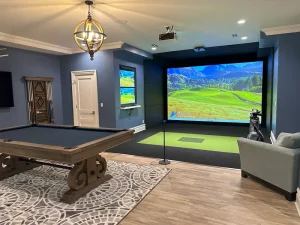
Lem runs a golf simulator forum with more than 75,000 followers. He asked members for real reviews of their setups, and BuilderBob, a golfer in Alberta, sent in a detailed one. He plays in an unheated shop with a FlightScope Mevo+, a homemade 10’ x 12’ frame and screen, and a projector he got free at an auction. He played E6 Connect on an iPhone for 10 months, then added GSPro when he bought a gaming PC. Everything in this section is his experience, and the screenshots are his.

E6 Connect on an iPhone
His Mevo+ came with a free E6 Connect license for iOS that included the driving range, practice modes, games and six courses. He ran it on a 2015 iPhone through a Lightning-to-HDMI adapter into the projector. The picture was decent for a phone, he says, but display resolution options were limited and the frame rate dropped when the graphics got busy. The small screen made aiming on the map and switching clubs fiddly.
The physics held up: shots bounced and rolled as expected, except for the occasional ball that nearly stopped on a slope and then rolled for 15 seconds or more. Sanctuary, with its big elevation changes, was his favorite course. The practice range keeps your recent shot data on screen, and the Darts game became the house favorite for parties.
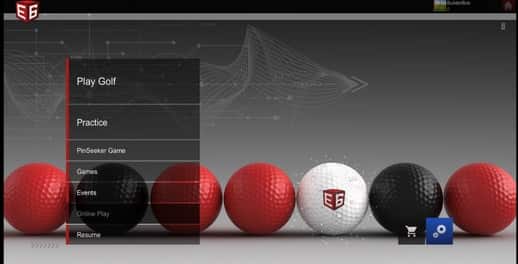

Where E6 stood out was tracking. The online dashboard keeps every round, your scorecard and the stats for each shot, calculates a handicap, and shows average and max distances. For putting, he switched on “Autoscore,” which assigns putts by distance once the ball stops on the green and speeds up rounds.


E6 Connect
Price: $1,000 for E6 Connect Home (27 courses); $300/yr Basic or $600/yr Expanded subscription, at Carl’s Place (checked Oct 6, 2026).
His summary: a good interface that works well, and an amazing value when it comes free with a launch monitor. Paying for more courses did not make financial sense for him; for an occasional player, the included courses are enough.
| Pros | Cons |
|---|---|
|
|
GSPro on a Gaming PC
After 10 months on E6, he bought a $1,200 CAD gaming PC and moved to GSPro, which was cheaper than the alternatives he looked at as a recurring subscription. The PC sits in the next room, with a 30-foot HDMI cable through the ceiling to the projector. Even though his PC fell short of the recommended graphics card, GSPro ran at 40+ frames per second on “Ultra” at 1280×720, and he found the graphics “substantially better” than E6, though he credits the PC more than the software for that.
The course selector has strong search and filters, and courses download (about 500MB each) so you can play offline. When he wrote his review there were about 600 courses; GSPro now lists more than 2,500. He found no drop in quality even though the courses are community-created, and named Bandon Dunes the hardest course he has played. See our best GSPro courses list for where to start.


Round setup is flexible. He uses “Course Recommended Settings” for weather and conditions, and “AutoPutt Fixed,” which rings the pin with circles and scores putts by where the ball stops. You can set weather from sunny to heavy snow, change the time of day, and give each player spin and distance adjustments so mixed-skill groups stay together. The physics impressed him, apart from trees that let a lot of balls through. His two wishes: a way to save and compare results like E6 does, and automatic switching to chipping mode near the green.


GSPro
Price: $250 per year (subscription license, Windows PC) at Carl’s Place (checked Oct 6, 2026). Activation code arrives within two business days.
His summary: if you have a computer that can run it, GSPro is a great value. Better course availability than E6, great graphics even below the recommended GPU, and an interface you can move through without getting lost.
| Pros | Cons |
|---|---|
|
|
Problems He Hit With Both
Wi-Fi juggling. The Mevo+ connects over its own Wi-Fi. Both programs needed an internet connection to start, so he had to launch the software online, then switch to the Mevo+ network to play, which also ruled out online play. A wired internet connection to the PC fixes this.
Short shots. Chips misread more often than full swings. E6 has a “slow swing” option, and GSPro works with the “Chipping” mode in the FlightScope window. Both helped a lot.
Putting. About half his putts were misread or missed, with either program. That is why he uses auto-putting in both: Autoscore in E6 and AutoPutt Fixed in GSPro.
Which Launch Monitors Work With Each
GSPro lists 31 officially supported launch monitors, including models from Uneekor, FlightScope, Foresight, Bushnell (Launch Pro), Full Swing (KIT), Garmin (R10 and R50), Rapsodo (MLM2Pro), ProTee (VX) and Square. SkyTrak is not on the official list. E6 Connect works with a wide range of monitors, and some include an E6 license in the box, as BuilderBob’s Mevo+ did. Check the current list for your monitor before you buy either program.
Our launch monitor finder lets you choose your simulator software, budget and space, then shows matching monitors with owner ratings from our survey of r/golfsimulator buyers.
Open the Launch Monitor Finder →FAQ
Is GSPro a one-time purchase or a subscription?
A subscription: $250 per year for a Windows PC license.
Does GSPro work on a Mac, iPad or iPhone?
No. GSPro requires a Windows 10 or Windows 11 PC. If you want to play from an iPad or iPhone, E6 Connect is the option of the two.
Do I need an E6 subscription after buying E6 Connect Home?
No. The $1,000 Home license includes 27 courses to keep. The $300 Basic and $600 Expanded subscriptions are optional add-ons for more courses.
Can I use GSPro and E6 Connect with the same launch monitor?
Yes, if your monitor supports both. BuilderBob ran both on the same Mevo+, E6 on an iPhone and GSPro on a PC.
More for your setup: best golf simulator software, making sense of launch monitor data and how to build a home golf simulator.
Lem has more than 40 years in golf and has spent about 15 years researching golf simulators, surveying home simulator users and facility owners on real-world use and satisfaction. He runs a golf simulator forum with 75,000+ followers, where owners like BuilderBob share hands-on reviews of their setups, and writes for the Sim Weekly newsletter.